A beautiful home can still have frustrating WiFi. The TV buffers in the upstairs bedroom, the patio speaker drops out, and a video call freezes the moment someone walks into the kitchen. When comparing mesh WiFi versus extenders, the right answer is not always the most expensive device. It depends on your home’s layout, construction, internet plan, and how many connected devices need reliable service at the same time.
For homes with streaming TVs, Sonos speakers, security cameras, smart-home controls, and work-from-home equipment, WiFi should be treated as part of the home’s infrastructure. A good solution is not just about getting a signal bar in every room. It is about maintaining enough speed and consistency for the systems you use every day.
Mesh WiFi Versus Extenders: The Core Difference
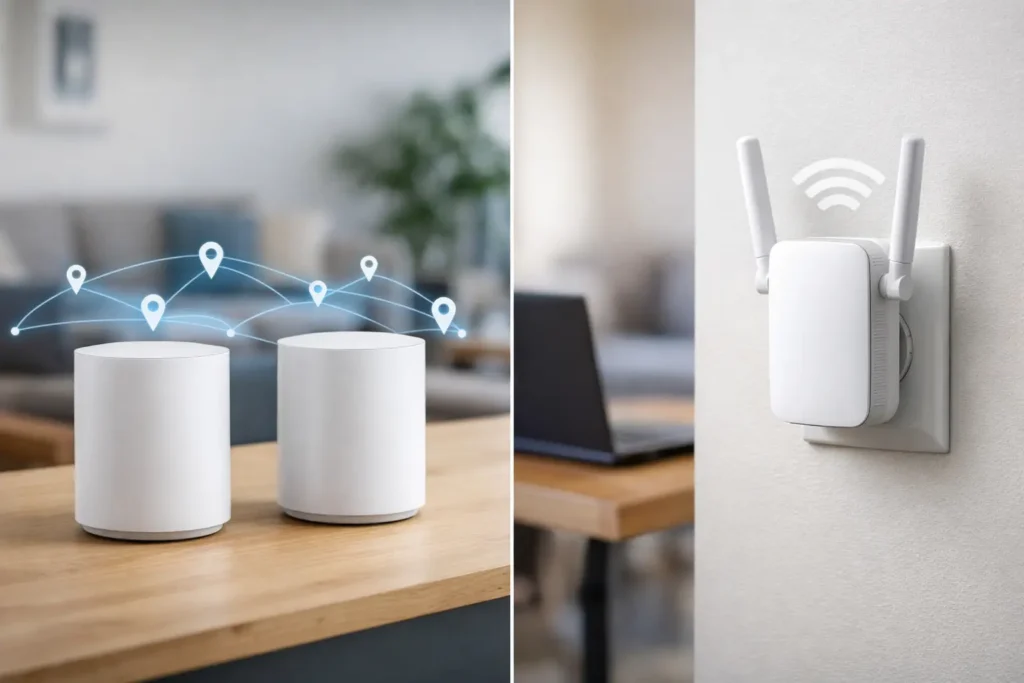
A WiFi extender, sometimes called a repeater, receives the existing signal from your router and broadcasts it again to reach an area with weak coverage. It can be a practical, lower-cost fix for one dead spot, such as a guest room, garage, or small patio.
A mesh WiFi system uses multiple coordinated access points, often called nodes, to create one larger wireless network. Instead of asking your phone, laptop, or streaming device to jump between several separate networks, a properly configured mesh system manages that handoff in the background. The goal is consistent coverage as you move through the home.
The distinction matters most in larger homes and connected homes. An extender is often a patch for a specific coverage problem. Mesh WiFi is more often a full-home design approach.
When a WiFi Extender Makes Sense
Extenders have a place, especially when the existing router is relatively modern and the WiFi problem is limited. If the signal is strong in most of the house but weak at one far end, installing a quality extender in the right location may solve the issue without replacing everything.
Placement is critical. An extender cannot create a strong signal from a weak one. It needs to sit somewhere between the router and the dead zone where it still receives a healthy connection. Plugging it directly into the room with no service usually produces disappointing results.
An extender can be a good fit when you have a smaller home, a modest number of connected devices, and one clear trouble area. It may also work well for a device that does not need maximum speed, such as a smart thermostat, a basic printer, or an occasional-use device in the garage.
The trade-off is performance. Many wireless extenders use part of their wireless capacity to communicate with the main router and part to communicate with client devices. Depending on the model and setup, that can reduce available speed. Some extenders also create a separate network name, which can make devices cling to a weak connection longer than they should.
Why Mesh WiFi Is Often Better for Connected Homes
Mesh WiFi is usually the stronger option when coverage problems occur in several places or when the home relies heavily on streaming and smart devices. Rather than extending one router from the edge of its range, mesh nodes are distributed through the property to provide coverage where it is needed.
This can be especially valuable in larger Newport Beach and Orange County homes, where multiple floors, long hallways, detached spaces, concrete, stone finishes, mirrors, metal framing, and dense cabinetry can all interfere with wireless signals. A router tucked inside a media cabinet or utility closet may be convenient visually, but it is rarely the best location for WiFi performance.
A mesh system can provide one network name throughout the property and better device roaming. That means a phone can move from the living room to the primary bedroom without holding onto a distant, weaker access point. Streaming devices, tablets, cameras, and smart-home hubs also have more nearby connection points available.
That said, not every mesh kit is automatically a high-performance solution. The number of nodes, their placement, their wireless standard, and the connection between them all matter. A low-cost mesh system placed poorly can still produce slow speeds and unreliable video.
The Backhaul Question
The connection between mesh nodes is called the backhaul. It is one of the most important details in a whole-home WiFi installation.
With wireless backhaul, nodes communicate with one another over WiFi. This can work well in an open home with reasonable distances between nodes, particularly with a tri-band mesh system that has dedicated wireless capacity for that communication. But thick walls and long distances can reduce its effectiveness.
With wired backhaul, each mesh node connects through Ethernet cabling. This is typically the best option for demanding homes because it frees up wireless capacity for phones, TVs, laptops, cameras, and smart devices. If a home is being remodeled or pre-wired for low voltage, adding network cabling is one of the smartest long-term decisions a homeowner can make.
For a media room or home theater, a wired connection to the TV, streaming player, gaming console, or AV receiver can also reduce buffering and improve stability. WiFi can be excellent, but a wired connection remains hard to beat for fixed entertainment equipment.
Performance Is More Than Internet Speed
Many homeowners assume a faster internet plan will fix WiFi issues. Sometimes it will, but often the real issue is coverage inside the home. You can pay for fast internet service and still receive poor performance in a back bedroom if the router signal cannot reach it effectively.
A useful way to think about the problem is to separate the connection coming into the home from the network distributing it inside the home. Your internet provider delivers service to the modem or gateway. Your router, access points, switches, and cabling determine how well that service reaches each device.
This becomes more noticeable when several activities happen at once. A family may be watching 4K content in the living room, listening to music outdoors, running security cameras, making a work call, and downloading a game update. The network needs enough coverage, capacity, and smart traffic management to handle all of it without turning into a daily source of frustration.
How to Choose Between Mesh and an Extender
Start with the pattern of the problem. If one room is weak and the rest of the home performs well, an extender may be a sensible first step. If multiple rooms have inconsistent service, devices drop connection while moving around, or your router is old, mesh WiFi is usually the better conversation.
Also consider whether your problem is actually a placement issue. A router sitting on the floor, behind a TV, inside a cabinet, or at one extreme end of the home is starting at a disadvantage. Moving equipment to a more central, open location can make a meaningful difference before adding any new hardware.
Think ahead as well. A basic extender may solve today’s dead zone, but it may not be the right investment if you are adding security cameras, outdoor speakers, more streaming TVs, or smart-home controls next year. A properly designed mesh network gives you more room to grow.
There are four situations where professional planning is particularly worthwhile:
- The home has multiple stories, dense building materials, or a large outdoor living area.
- Streaming, gaming, security cameras, and remote work all compete for the network.
- The network equipment is hidden in a closet, rack, cabinet, or another poor wireless location.
- You are remodeling, adding low-voltage wiring, or installing a theater or smart-home system.
Installation Details That Change the Result
Good WiFi equipment cannot overcome poor installation. Nodes should be placed where people use devices, not simply where outlets are easiest to reach. They should remain out in the open when possible, away from large metal objects, electrical panels, and enclosed cabinetry.
Network names, passwords, security settings, and router configuration also deserve attention. A complete installation should account for device handoffs, guest access, firmware updates, bandwidth settings, and compatibility with existing smart-home equipment. Security cameras and AV systems are not helpful if the network supporting them is unreliable.
Tri Star Home Theater can evaluate the entire setup, from the location of the incoming internet equipment to the performance of TVs, speakers, cameras, and smart devices throughout the property. That hands-on approach helps avoid a common mistake: buying more hardware before identifying the real bottleneck.
A reliable home network should disappear into the background. When the movie starts quickly, the music reaches the patio, the cameras stay connected, and everyone can work or stream without thinking about WiFi, the system is doing its job.
Ready for a free consultation? Let’s get in touch! Call (949) 878-0531 Today