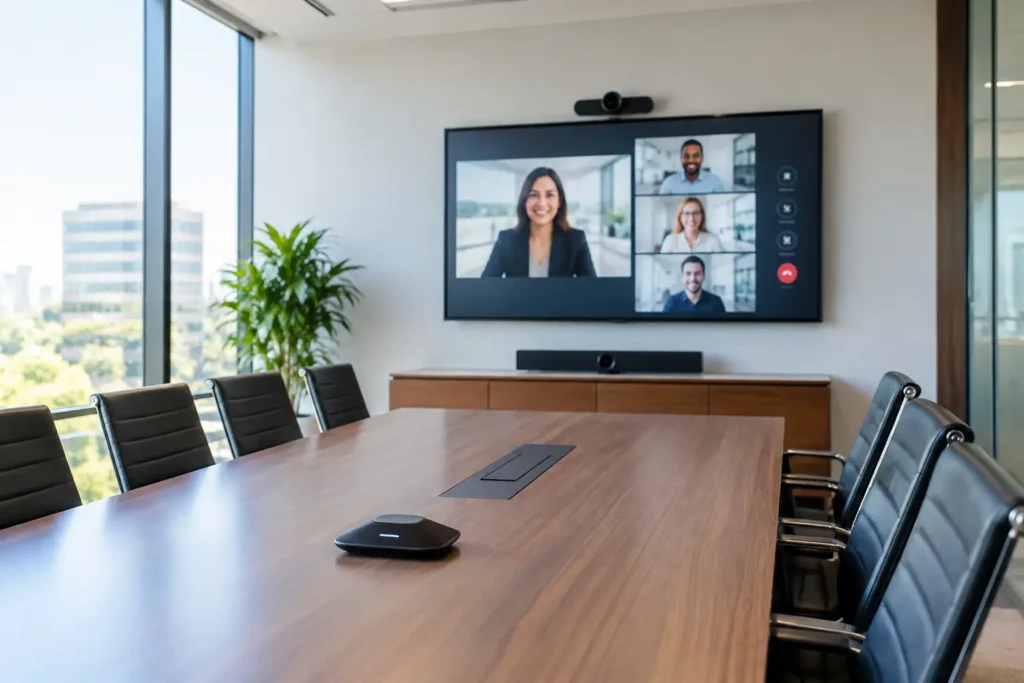
A conference room can have a beautiful table, comfortable chairs, and a great view, yet still frustrate everyone who uses it. If the display takes 10 minutes to connect, remote attendees cannot hear the discussion, or cables clutter the table, the room is working against the business. Professional conference room AV installation solves those everyday problems with a system that is clear, easy to use, and designed around how your team actually meets.
For small businesses in Orange County, the goal is rarely to build a complicated corporate boardroom. It is to make presentations, video calls, training sessions, and client meetings start on time without asking an employee to become the office tech expert.
Start With How the Room Will Be Used
The right equipment depends on the room, but more importantly, it depends on the meeting. A small office huddle room used by two to six people has different needs than a conference space where a team presents to clients, shares detailed plans, or hosts weekly hybrid meetings.
Before selecting a screen or camera, consider who will be in the room, where they will sit, and what they need to see and hear. Will people bring their own laptops? Is the room primarily used for Zoom, Microsoft Teams, or Google Meet? Do presentations include spreadsheets and detailed drawings that need to remain readable from the back of the room? Will the system need to support staff members who are not comfortable troubleshooting technology?
These details shape the design. A large display may be more practical than a projector in a bright room with windows. A projector and motorized screen can be an excellent fit for a larger training space where image size matters. In either case, screen height, viewing distance, glare, and furniture placement should be addressed before equipment is mounted.
What a Dependable Conference Room AV Installation Includes
A well-planned system brings several components together, but the finished result should feel simple. Staff should be able to enter the room, connect a laptop or start a scheduled call, and focus on the people in the meeting.
A display that is sized and placed correctly
A display that is too small forces attendees to lean forward or squint at shared content. One mounted too high can cause discomfort during longer meetings. Proper placement also accounts for windows, ceiling lights, wall construction, and cable paths. The cleanest installations conceal power and low-voltage wiring rather than leaving cords visible below the screen.
For many small-business conference rooms, a commercial-grade or quality large-format TV provides the best balance of brightness, reliability, and value. Projectors make sense when the room is larger, the desired image is well over 85 inches, or a screen can be integrated into the room design. The trade-off is that projectors require more attention to ambient light, throw distance, and periodic maintenance.
Audio people can understand the first time
Poor meeting audio is one of the fastest ways to make a room feel unprofessional. A camera’s built-in microphone may work for two people seated close together, but it often falls short when participants sit farther away or the room has hard surfaces that create echo.
The answer may be a dedicated USB conference speakerphone, ceiling microphones, wall-mounted speakers, or a soundbar designed for video conferencing. The right choice depends on room size, ceiling height, acoustics, and how many people regularly attend. In a compact room, a single all-in-one video bar may provide excellent results. In a larger space, separate microphones and speakers often produce more natural, consistent audio.
A camera with the right framing
Remote attendees should be able to see the people speaking, not just a wide, distant view of the entire room. A properly positioned camera frames the table and participants at a useful angle, with lighting considered as part of the installation. A bright window behind the speaker can turn faces into silhouettes, even with a high-quality camera.
Wide-angle cameras are useful in smaller rooms, while larger conference spaces may benefit from pan, tilt, and zoom capabilities. Auto-framing can be helpful, but it is not automatically better. In rooms with frequent movement, overly aggressive auto-framing can be distracting. A fixed, well-composed camera view is sometimes the more dependable choice.
Simple connections and controls
The best control system is the one employees will use correctly without instructions taped to the wall. That may be as straightforward as a single HDMI or USB-C connection at the table, paired with a wireless presentation option. It can also include a dedicated meeting-room computer or video conferencing appliance for teams with frequent scheduled calls.
Wireless sharing adds convenience, but a wired connection should remain available. WiFi congestion, laptop compatibility, and guest access can occasionally interfere with wireless presentation systems. Providing both options prevents a simple connection issue from delaying an important meeting.
Plan the Wiring Before the Furniture Is Final
Clean cable management is not just an aesthetic detail. It protects connections, reduces trip hazards, and makes future service much easier. During a conference room AV installation, cabling should be planned from the display location to the table, equipment cabinet, network connection, and power source.
In a finished office, cables can often be routed through walls, ceilings, raceways, or furniture channels with minimal disruption. For a remodel or new build, low-voltage pre-wiring offers more options and a cleaner outcome. Running extra conduit or pull strings during construction is a small investment that can save considerable cost if the office later adds a second display, upgraded cameras, new speakers, or control equipment.
It is also wise to consider where the equipment will live. Hiding every device in an inaccessible cabinet may look neat on day one, but it makes resets, updates, and service difficult later. An organized, ventilated equipment location with labeled cables supports long-term reliability.
Do Not Overlook the Network
Video calls depend as much on the network as they do on the camera and display. A high-resolution camera cannot overcome weak WiFi, an overloaded access point, or an unreliable internet connection. Whenever possible, the primary conferencing device should use a wired network connection.
A wired connection is especially valuable for a dedicated meeting computer, conferencing appliance, or wireless presentation receiver. It reduces dropouts and gives the system a more stable foundation. If WiFi is the only practical option, an assessment of access point placement, coverage, and bandwidth is worth doing before blaming the AV equipment for call quality problems.
Network security matters as well. Guest presentation access should be configured thoughtfully, and office systems should not be left open to anyone who walks into the room. The ideal setup balances easy access for invited guests with sensible protection for the business.
Avoid Common Conference Room Mistakes
Most frustrating room setups do not fail because the equipment is cheap. They fail because individual products were chosen without considering the complete system. A premium TV paired with a weak microphone still produces a poor video call. A sophisticated control system that requires six steps to start a meeting creates its own problem.
Another common mistake is buying equipment based only on specifications. Bigger is not always better if the display overwhelms a narrow room or cannot be viewed comfortably. More speakers are not always better if they create uneven sound or feedback. Features should serve the room, not complicate it.
Finally, avoid treating the installation as finished once the hardware is mounted. The system needs testing with real laptops, actual conferencing platforms, normal room lighting, and several people speaking from different seats. Staff should receive a brief walkthrough, including what to do if a laptop does not connect or a call needs to be restarted.
Professional Installation Protects the Meeting Experience
A professional installer can evaluate the physical room, recommend equipment that fits the budget, mount and wire the components cleanly, configure the system, and verify that it works under real conditions. That integrated approach is particularly helpful for offices that need help with displays, video conferencing, speakers, WiFi, remote programming, or cable concealment under one plan.
For Southern California businesses, Tri Star Home Theater provides hands-on AV installation and practical support without the impersonal approach often associated with big-box providers. The focus is not on adding technology for its own sake. It is on creating a room your employees and clients can use with confidence.
A conference room should remove friction from a conversation, not create more of it. Thoughtful planning now gives your team a space that looks professional, sounds clear, and stays useful as the way you work changes.
Ready for a free consultation? Let’s get in touch! Call (949) 878-0531 Today