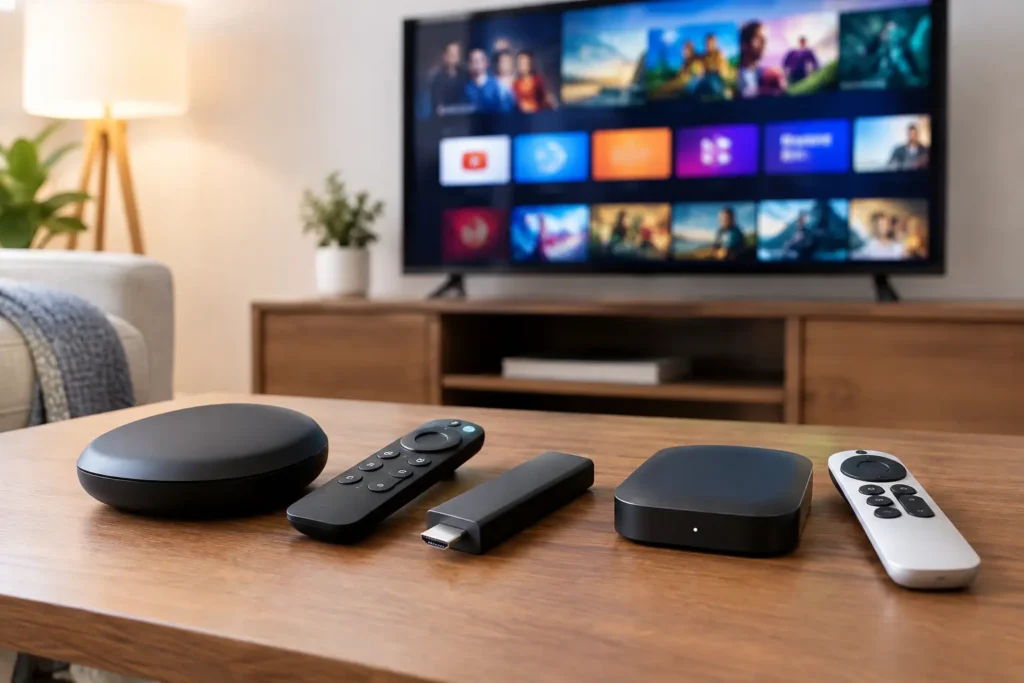
A perfectly good television does not need to become a bedroom relic just because its built-in apps are slow, missing, or nonexistent. The best streaming devices for older TVs can add Netflix, live TV, music, and more without replacing a screen that still delivers a picture you enjoy. The right choice, however, depends less on the streaming brand and more on the connections, resolution, Wi-Fi, and sound system already in your home.
For many Orange County homeowners, this comes up during a media-room refresh or when a secondary TV needs to be useful again. A compact streamer is often the practical answer, but a quick compatibility check can prevent frustrating black screens, unreliable remotes, and unnecessary equipment purchases.
Start With the TV Connection
The connection on the back of the TV determines what is realistically possible. Most flat-panel TVs made within the last 15 years have at least one HDMI input. If yours does, nearly any current streaming stick or set-top box can work. Select the correct HDMI input with the TV remote, connect the device to power, join your home Wi-Fi, and complete the on-screen setup.
An older HDMI television may only support 720p or 1080p. That is not a problem. Most modern streaming devices can automatically send a compatible HD signal, although the menus and video may not look as sharp as they do on a current 4K display. For a guest room, kitchen, office, or casual viewing area, HD can still look very good.
TVs with only red, white, and yellow composite inputs require more caution. An HDMI-to-composite converter is needed, but not every inexpensive adapter handles copy-protected streaming content correctly. Some will show a menu but fail when an app starts playing a movie. The converter also needs its own power and must downscale the HDMI signal to standard definition.
That setup can make sense for a cherished tube TV or a TV built into older cabinetry, but expectations should be modest. Text can look soft, widescreen programming may be letterboxed, and the added hardware introduces another possible failure point. If the screen is not especially valuable, replacing it may be the more dependable and cost-effective path.
Best Streaming Devices for Older TVs With HDMI
Roku Express or Roku Streaming Stick
For a straightforward HD TV upgrade, Roku is often the easiest recommendation. Its home screen is simple, app choices are broad, and the platform does not demand much technical knowledge once it is configured. The Roku Express is a sensible, budget-conscious choice when the streaming device can sit visibly near the television.
A Roku Streaming Stick is better when the equipment needs to stay out of sight. It plugs directly into the HDMI input and can usually be hidden behind the TV. This is useful for wall-mounted televisions where exposed boxes and dangling cables take away from an otherwise clean installation.
Roku is particularly appealing for households that want a familiar remote and uncomplicated navigation. The trade-off is that different Roku models offer different remote features. Basic versions may require the original TV remote for power and volume, while upgraded remotes can control those functions directly. Checking that detail before purchase saves an extra remote from landing on the coffee table.
Amazon Fire TV Stick
A Fire TV Stick is a strong fit for viewers who already use Amazon services, Alexa-enabled speakers, or Prime Video regularly. It is small, widely supported, and available in versions suited to HD and 4K TVs. On an older HDMI set, it will generally reduce its output to a compatible resolution.
The voice remote can be convenient for searching by title or opening an app without working through menus. Fire TV also tends to place Amazon content prominently throughout the interface. That can be helpful for Prime households, but viewers who prefer a more neutral app grid may find Roku less distracting.
Pay attention to power. Although some TVs have a USB port, older sets may not provide enough power to run a Fire TV Stick reliably. Using the included wall adapter is usually the better choice. It avoids random restarts, slow performance, and a streamer that turns off whenever the TV changes power state.
Apple TV 4K
Apple TV 4K is the premium choice for an older television that is still part of a higher-quality entertainment system. It works over HDMI and is especially useful in homes that already use iPhones, iPads, Apple Music, or Apple Home. The interface is polished, the processor is fast, and the remote can often be programmed to control TV power and volume.
It may be more streaming device than a small 720p bedroom TV requires. But it becomes a smart investment when the TV connects to an AV receiver, soundbar, or whole-home audio setup. Apple TV generally handles app performance and audio handoff very well, making it a strong option when reliability matters more than the lowest price.
Google TV Streamer
Google TV devices are worth considering for households that use Android phones, Google Home controls, or YouTube TV. The interface emphasizes personalized recommendations, and voice search can be useful when a family watches across several apps. It connects through HDMI, so it is appropriate for most older flat-panel TVs but not for composite-only sets without a converter.
The main consideration is interface preference. Google TV does a good job surfacing content across services, but some homeowners simply prefer a cleaner, less recommendation-heavy home screen. The best platform is the one everyone in the home can use comfortably.
Do Not Let Wi-Fi Be the Weak Link
A streaming device cannot compensate for weak wireless coverage. This is a common problem in larger homes, remodeled properties with dense walls, and rooms located far from the main router. When a streamer buffers, loses connection, or drops picture quality, the issue is often Wi-Fi coverage rather than the television or the device itself.
Before blaming the streamer, test another device in the same room. If phones and tablets also struggle, a Wi-Fi upgrade, access point, or properly placed mesh system may be needed. When practical, a wired Ethernet connection is even more dependable, especially for a theater room or a TV used for live sports.
Older TVs are often installed in locations that were never designed around modern networking, such as patio areas, garages, converted offices, or built-in cabinets. A professional setup can keep the streamer, power supply, network connection, and cabling organized instead of turning the area behind the screen into a hard-to-service tangle.
Plan for Sound and Remote Control
Picture is only half the experience. If an older TV uses a soundbar, receiver, or surround sound system, connect the streaming device to the component that best supports your system. A TV with ARC may send sound back to a soundbar through HDMI, while older equipment may require an optical audio cable or a direct connection through an AV receiver.
This is where compatibility gets more specific. Some older TVs pass only stereo sound from their HDMI inputs, even when a streaming app is sending surround audio. In other systems, the TV itself may not support ARC at all. Connecting the streamer directly to the receiver can preserve better sound, but it adds input switching to the daily routine.
Remote programming makes the difference between a system that feels easy and one that no one wants to use. Ideally, one remote should handle TV power, volume, streaming navigation, and the correct input. If that is not possible with the included remote, a universal remote or programmed control system can simplify the experience for every member of the household.
When an Upgrade Makes More Sense Than an Adapter
A streaming device is an excellent upgrade when the existing TV has HDMI, a good picture, and a location where a larger screen is not needed. It is less compelling when the TV has no HDMI, poor brightness, failing inputs, or an outdated panel that struggles with modern programming.
There is also the cost of making an older setup work. By the time you add a converter, power adapter, cabling, Wi-Fi improvement, and remote solution, a replacement TV can sometimes offer better value. A newer display can provide higher brightness, simplified audio connections, and a cleaner installation with fewer components to troubleshoot later.
The best choice is not always the newest piece of equipment. It is the setup that fits the room, works with the way your household watches, and remains easy to operate after the installation is complete. Tri Star Home Theater can help evaluate the TV, connections, sound system, and network before you spend money on gear that may not solve the real issue.
A careful setup can give an older television several more useful years while keeping the room comfortable, uncluttered, and simple to enjoy.
Ready for a free consultation? Let’s get in touch! Call (949) 878-0531 Today